Convert CSV to MySQL in Three Steps
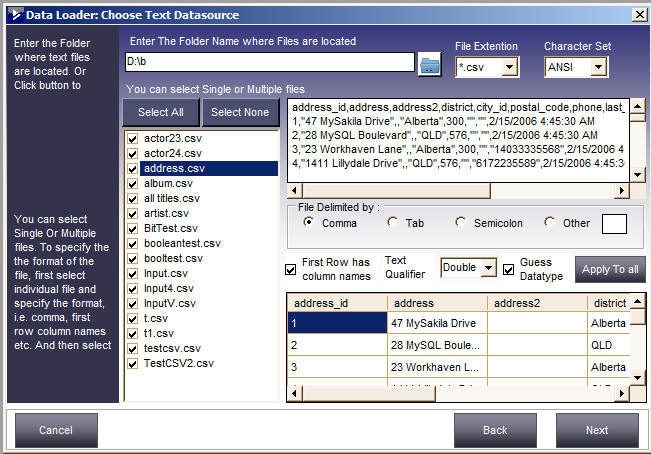
Step 1: Select the folder and CSV files you want to load
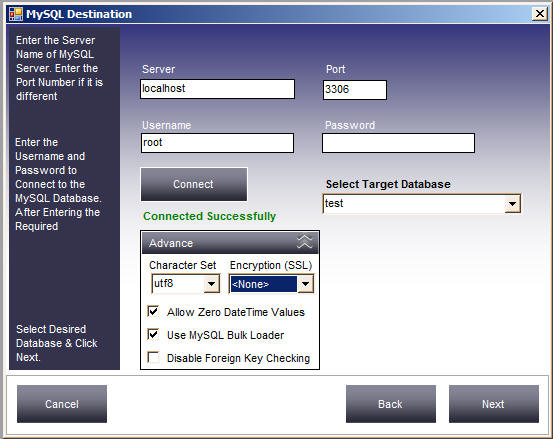
Step 2: Select the MySQL target database
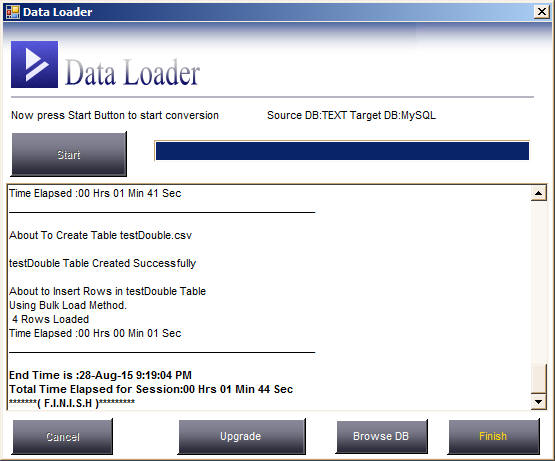
Step 3: Click the Start button
CSV to MySQL Loader is a tool to convert and migrate data from CSV files to a MySQL database, or from MySQL to CSV files. Convert multiple files in one go, map source columns to matching destination columns, and filter rows by specifying WHERE conditions.
CSV to MySQL Loader comes with a built-in scheduler so you can run transfer jobs at specified intervals — no need to run jobs repeatedly. Just create a session, define the schedule date and time, and it will automatically execute your session in the background and record the actions in a log file which you can check later.
It also provides a command line interface to run migration jobs manually, so it can be easily integrated with your own application. All sessions are stored in a repository, with a user friendly interface to take a backup, restore from a previous backup, or create a new blank repository.
CSV stands for Comma Separated Values — a simple, common standard for tabular data. It's supported by a huge range of tools, from spreadsheets like Excel, OpenOffice, and Google Docs, to complex databases and almost all programming languages. It is probably the most widely supported structured data format in the world.
As a CSV file is plain text, you can open it in any text editor. It looks something like this:
101,"Smith Jones",4000
102,"Karren",2300
104,"John, Kenny",8000CSV lacks any way to specify type information — there's no way to distinguish "1" the string from 1 the number. This shortcoming can be addressed by adding some form of simple schema.
No support for relationships between different "tables".
CSV is really only for tabular data — it's not so good for data with nesting or where structure isn't tabular.
Using our tool you can easily load data from any CSV file into MySQL or other databases. Just select the CSV files and let the tool do the rest.
As simple as this. Download the Trial Edition now and test it yourself!
Download CSV to MySQL