Introduction to HTML Forms Data Loader — a great tool to load data into Oracle Apps Self Service forms.
HTML Forms Data Loader is another useful tool from Interface Computers to automate loading data into Oracle R12 EBS Self Service Forms, or any HTML forms. Unlike the Macro Loading feature of Data Loader, which can go out of sync for several reasons, loading data through this tool is reliable and accurate.
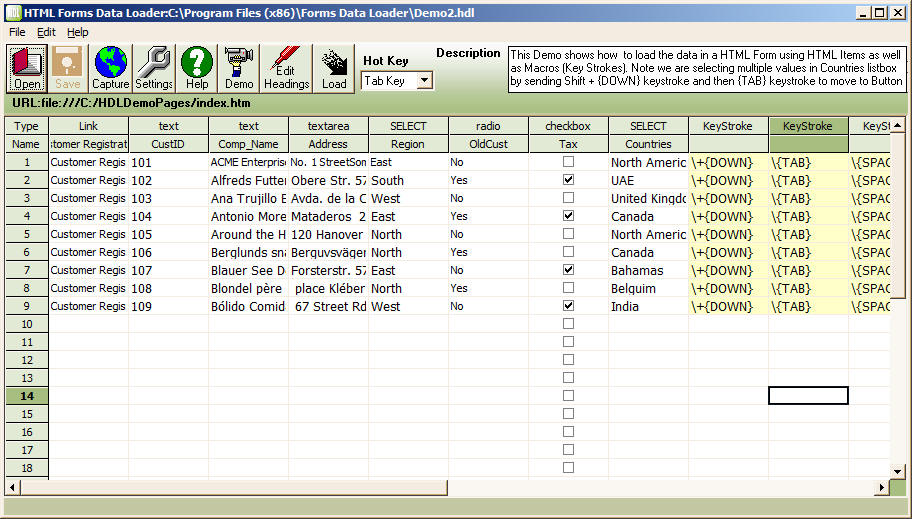
A user has complete control of the load. After the load finishes, HDL shows which rows loaded successfully and which had errors, marking them in green and red. It also shows how many rows were processed and how many remain, whether loading finished or was cancelled.
You can load thousands of rows through front-end HTML forms without any user interaction.
The spreadsheet with your data from CSV or Excel
To develop a load, just open the HTML form in the built-in browser, then click Start Recording. HDL will automatically capture the items you enter data in or click. After you finish entering data and complete the navigation, click Stop Recording.
HDL then shows the items in a spreadsheet. Copy and paste data from Excel, or import it from a CSV or delimited file, then click Start Loading — that's it! HTML Forms Data Loader will start playback and fill forms automatically.
To learn step by step how to load data using HDL, see How to Load Data Using HTML Forms Data Loader, and don't forget to watch demo videos at www.formsdataloader.com.