Generate SQL Dump Files


Create target-compatible SQL scripts from any supported database — ideal for environments where a direct connection to the destination database isn't available.

Why Generate a SQL Dump File?

Data Loader can generate SQL dump files that can be executed directly against your target database — without requiring Data Loader to hold an active connection to that target at the same time.

This is especially useful when you don't have direct network access to the destination server. For example, suppose you have a table in Microsoft SQL Server that you need to migrate to a MySQL database hosted on another machine, and for security or network reasons Data Loader cannot connect to that MySQL server directly.

In this scenario you can generate a MySQL-compatible dump file from the source table, transfer the resulting .sql file to the MySQL server by any means you like (SCP, email, USB drive), and then execute it there using the native MySQL client utility.
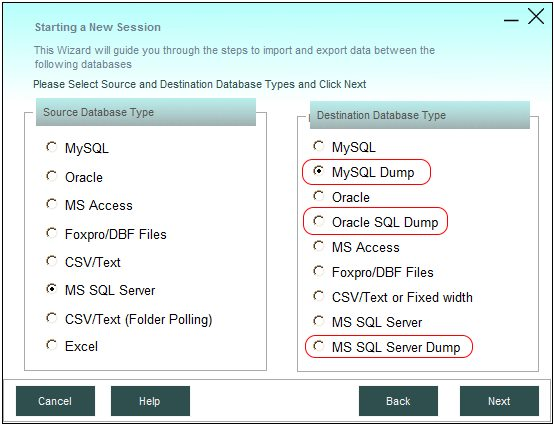
Data Loader generating a SQL dump file

Supported Source-to-Target Combinations

Data Loader can generate a correctly-formatted dump file for any of the following source and target database combinations:

Source Database Target Dump File Format
Microsoft SQL Server MySQL, Oracle, or MS SQL Server SQL file
MySQL MS SQL Server, Oracle, or MySQL SQL file
Oracle MySQL, MS SQL Server, or Oracle SQL file

Each generated dump file uses the correct data types, quoting, and statement syntax for the chosen target platform — no manual conversion needed.

Sample Generated Dump File

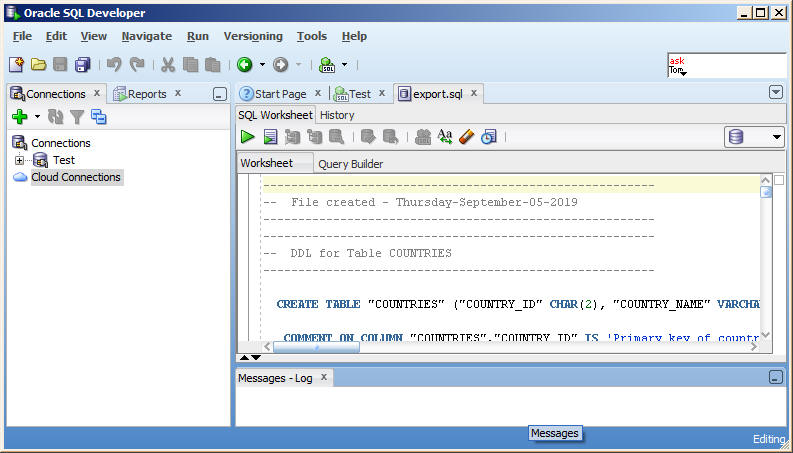
Below is an example of a MySQL-compatible dump file generated by Data Loader from a Microsoft SQL Server source table. Note the table structure statement followed by the data rows, ready to run as-is on the target server.

#MySQL SQL Dump File. Created on: 14-02-2026 09:12:31
#Created from MSSQL
#Created with Data Loader Ver.: 4.9.6
#For more information please visit https://www.dbload.com
#
# Table structure for: CreditCard
#
CREATE TABLE `CreditCard` (
`CreditCardID` INTEGER NOT NULL,
`CardType` NVARCHAR(50) NOT NULL,
`CardNumber` NVARCHAR(25) NOT NULL,
`ExpMonth` SMALLINT NOT NULL,
`ExpYear` SMALLINT NOT NULL,
`ModifiedDate` DATETIME NOT NULL
) CharSet=utf8 Engine=InnoDB;
#
# Dumping rows for table: CreditCard
#
INSERT INTO `CreditCard` (`CreditCardID`, `CardType`, `CardNumber`, `ExpMonth`, `ExpYear`, `ModifiedDate`) VALUES
(1, 'SuperiorCard', '33332664695310', 11, 2026, '2026-01-30 00:00:00'),
(2, 'Distinguish', '55552127249722', 8, 2026, '2026-02-06 00:00:00'),
(3, 'ColonialVoice', '77778344838353', 7, 2027, '2026-03-15 00:00:00');
#
ALTER TABLE `CreditCard` ADD PRIMARY KEY (`CreditCardID`);
ALTER TABLE `CreditCard` CHANGE COLUMN `CreditCardID` `CreditCardID` INTEGER NOT NULL AUTO_INCREMENT;
CREATE UNIQUE INDEX `AK_CreditCard_CardNumber` ON `CreditCard`(`CardNumber`);

Generated SQL dump file opened in a SQL editor

Scheduling Automatic Dump Generation

Beyond one-off exports, Data Loader can automatically regenerate SQL dump files on a schedule you define — hourly, daily, weekly, or at whatever interval fits your workflow — using its built-in scheduler.

Each scheduled dump session can run in one of two modes:

  • Overwrite — replaces the existing dump file entirely with the latest data on every run.
  • Append — adds only the newest rows onto the end of the existing dump file, leaving prior contents intact.

Where This Fits In

  • Migrating to a database server that only allows file-based imports
  • Sending a colleague or client a ready-to-run copy of a dataset
  • Keeping an offline, versioned backup of a table's data as plain SQL
  • Staging data changes for review before they're applied to production

See the UPSERT and INSERT guide if you also need conditional updates rather than a full dump.

Ready to generate your first dump file?

Download the free trial — no credit card, no time limit. See how easy it is yourself.