Using SSL Connection in Data Loader


How to use SSL encryption when connecting to MySQL through Data Loader.

How to Use SSL Encryption for Connecting to MySQL

If we are moving data to and from a MySQL database using a public network, then anybody on the network can potentially see the data, compromising data security. With an unencrypted connection between the MySQL client and server, someone with network access can monitor all traffic and check the data sent or received between the client and server.

When information needs to be moved securely over a network, an unencrypted connection cannot be accepted. MySQL uses encryption to make all types of data unreadable to eavesdroppers.

MySQL supports encrypted connections between clients and servers using the Transport Layer Security (TLS) protocol — TLS is sometimes referred to as Secure Sockets Layer (SSL). Here is how you can configure MySQL Server for SSL encryption.

Server Side

We can start the MySQL server with the --ssl option, which specifies that the server permits but does not require encrypted connections — meaning MySQL can accept both encrypted and unencrypted connections. This option is enabled by default whenever you start MySQL, so it need not be specified explicitly.

To make it mandatory that clients connect using encrypted connections, we need to enable the require_secure_transport system variable.

To specify the certificate and key files the MySQL server uses when permitting clients to establish encrypted connections, we need to define these server variables in the MySQL configuration file (my.cnf) on the server:

Client Side

Coming to the client side, if you are using Data Loader for exporting or importing data into a MySQL database, you can use SSL encryption by specifying the following settings in the MySQL Source or Target screen.

SSL Preferred

If you want to connect to MySQL with encryption when the MySQL server supports it, you can specify the following settings.
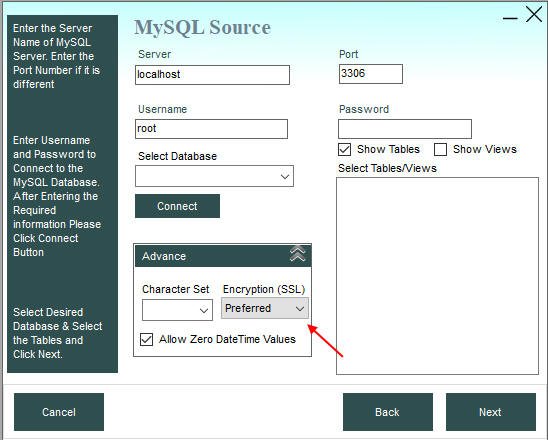
SSL preferred for MySQL

This setting will use encryption if the MySQL server supports it, or will not use encryption if the server doesn't support it — the connection will get established either way.

SSL Required

If you want your connection to MySQL to be mandatorily encrypted, you can specify the SSL - Required setting as shown below.
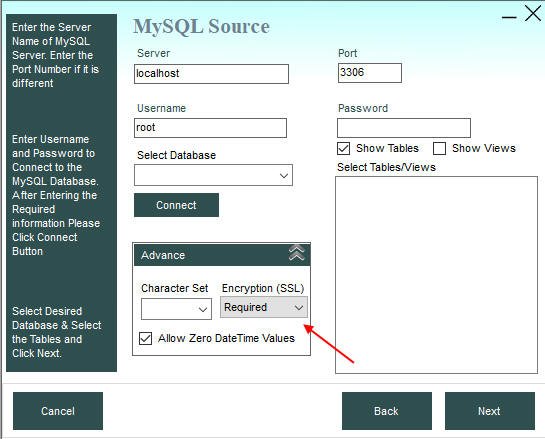
SSL required for MySQL

If you specify this setting, Data Loader will connect to MySQL with compulsory encryption — if the MySQL server doesn't support encryption, the connection will not be established.

Using File-Based Certificates

To use a file-based SSL certificate, put the path of the certificate in the Server textbox preceded by a semicolon (";") as shown below.

For example, if your SSL certificate file is C:\yourfolder\client.pfx and your server address is localhost, put the following in the Server textbox in Data Loader:

localhost;CertificateFile=C:\yourfolder\client.pfx;CertificatePassword=pass;
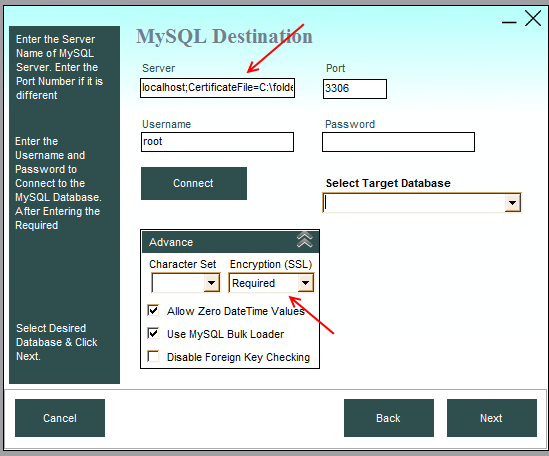
Using SSL file certificate in Data Loader

Download Data Loader