Now you're ready for conversion. Click the Start button to begin.
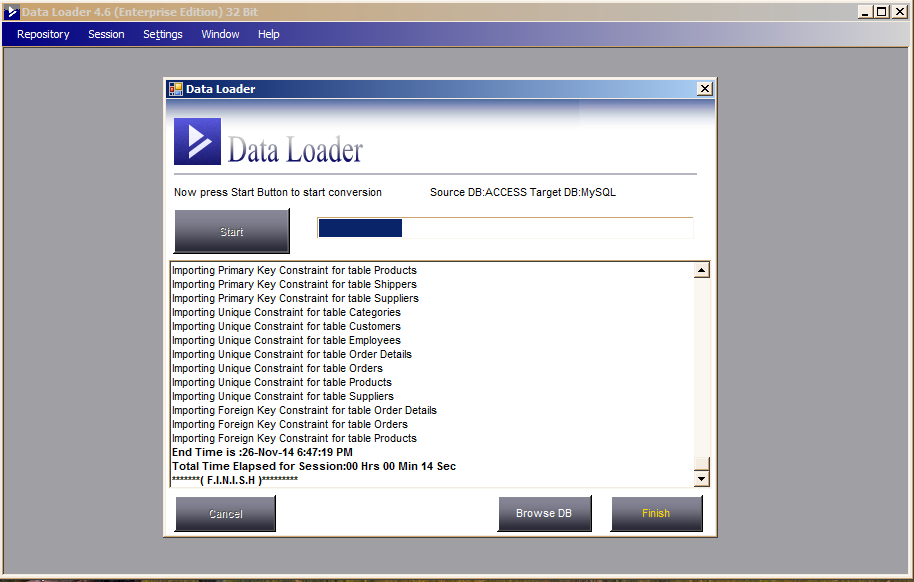
After conversion, click the Finish button.
Start the conversion process and watch the progress in the log window.
Now you're ready for conversion. Click the Start button to begin.
After conversion, click the Finish button.
As conversion runs, Data Loader shows progress in the progress bar and records all actions in a log, including any error messages and warnings. Below is an example log file:
Started loading at :26-Nov-14 6:47:05 PM
___________________________________________________

About to Drop Table :Categories
Droping referencing Foreign Key constraints
Categories Table dropped
About To Create Table Categories

Categories Table Created Successfully

About to Insert Rows in Categories Table
8 Rows Loaded
Time Elapsed :00 Hrs 00 Min 03 Sec
___________________________________________________

About To Create Table Customers

Customers Table Created Successfully

About to Insert Rows in Customers Table
Using Bulk Load Method.
91 Rows Loaded
Time Elapsed :00 Hrs 00 Min 00 Sec
___________________________________________________

About To Create Table Employees

Employees Table Created Successfully

About to Insert Rows in Employees Table
9 Rows Loaded
Time Elapsed :00 Hrs 00 Min 01 Sec
___________________________________________________

About to Drop Table :Orders
Orders Table dropped
About To Create Table Orders

Orders Table Created Successfully

About to Insert Rows in Orders Table
Using Bulk Load Method.
828 Rows Loaded
Time Elapsed :00 Hrs 00 Min 01 Sec
___________________________________________________

About to Drop Table :Products
Products Table dropped
About To Create Table Products

Products Table Created Successfully

About to Insert Rows in Products Table
Using Bulk Load Method.
77 Rows Loaded
Time Elapsed :00 Hrs 00 Min 00 Sec
___________________________________________________

About to Drop Table :Shippers
Shippers Table dropped
About To Create Table Shippers

Shippers Table Created Successfully

About to Insert Rows in Shippers Table
3 Rows Loaded
Time Elapsed :00 Hrs 00 Min 01 Sec
___________________________________________________

About To Create Table Suppliers

Suppliers Table Created Successfully

About to Insert Rows in Suppliers Table
Using Bulk Load Method.
29 Rows Loaded
Time Elapsed :00 Hrs 00 Min 00 Sec
___________________________________________________

___________________________________________________

Importing Primary Key Constraint for table Categories
Importing Primary Key Constraint for table Customers
Importing Primary Key Constraint for table Employees
Importing Primary Key Constraint for table Order Details
Importing Primary Key Constraint for table Orders
Importing Primary Key Constraint for table Products
Importing Primary Key Constraint for table Shippers
Importing Primary Key Constraint for table Suppliers
Importing Unique Constraint for table Categories
Importing Unique Constraint for table Customers
Importing Unique Constraint for table Employees
Importing Unique Constraint for table Order Details
Importing Unique Constraint for table Orders
Importing Unique Constraint for table Products
Importing Unique Constraint for table Suppliers
Importing Foreign Key Constraint for table Order Details
Importing Foreign Key Constraint for table Orders
Importing Foreign Key Constraint for table Products
End Time is :26-Nov-14 6:47:19 PM
Total Time Elapsed for Session:00 Hrs 00 Min 14 Sec
*******( F.I.N.I.S.H )*********
The conversion log is saved and you can view it anytime via "Manage Existing Sessions" on the Data Loader start screen.
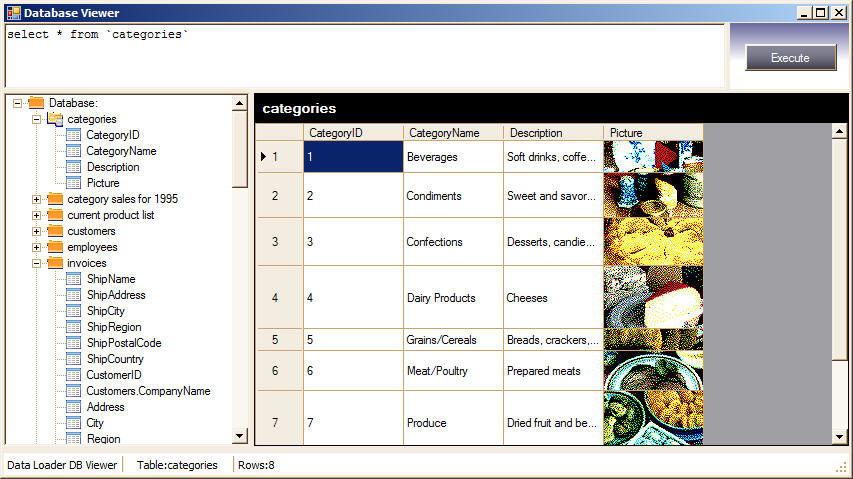
To view the just-converted data, click "Browse DB" to browse the target database from Data Loader itself.
In this tour we've covered basic conversion from one database to another. Data Loader is capable of much more — advanced features like UPSERT and INSERT, folder polling, and creating SQL dumps for MySQL, MS SQL Server, and Oracle from any data source. SQL dumps are useful when you don't have direct access to the database.
That's it — thanks for viewing!