Convert MSSQL to MySQL: Tools, Methods, and Best Practices


Convert MSSQL to MySQL easily with expert-recommended methods and tools. Learn about best practices, challenges, and the best MS SQL to MySQL migration tool.

What is MS SQL and MySQL?

MS SQL Server

Microsoft SQL Server is a powerful relational database management system (RDBMS) designed for enterprise applications. It supports complex queries, stored procedures, and advanced data security features.

MySQL

MySQL is an open-source RDBMS widely used for web applications, offering high performance, ease of use, and strong community support. It is especially popular in LAMP (Linux, Apache, MySQL, PHP) environments.

Key Differences Between MS SQL and MySQL

FeatureMS SQLMySQL
LicensingProprietaryOpen Source
Supported PlatformsWindowsWindows, Linux, macOS
Stored ProceduresAdvanced supportBasic support
CostPaid (enterprise edition)Free & Paid (Enterprise)

Why Convert MS SQL to MySQL?

Common Methods to Convert MS SQL to MySQL

Manual Export/Import Method

The straightforward method is to dump the table data as a CSV file, create the table structure manually in MySQL by adjusting the datatypes, then import the data from the CSV file. This method — although it looks simple — isn't suitable if you have to transfer multiple tables.

Using Migration & Automated Conversion Tools

There are several tools, both free and paid, available which will do the migration automatically without you writing any code. In fact, some tools do the job in just three clicks. Here is the list of tools:

See also: Top 3 tools for converting MSSQL to MySQL

Data Loader

Data Loader is a powerful tool to convert and migrate data from MSSQL to MySQL or from MySQL to MS SQL Server databases. It can convert hundreds or thousands of tables in one go. While converting, you can map source table columns to matching destination table columns, and filter rows by specifying WHERE conditions. Besides tables, it can also convert Views.

Apart from conversion, it can also synchronize data between MS SQL and MySQL using its own scheduler. It can update, insert, or delete rows from target tables to match the source tables.

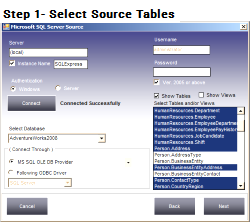
Convert MSSQL to MySQL
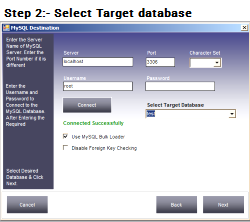
Target MySQL
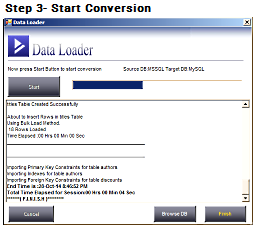
Start MSSQL to MySQL Conversion

It converts schemas, data, constraints, indexes, auto increment and default values in just three steps without writing a single line of code. It automatically chooses the most appropriate datatypes and widths, and also lets users choose their own types.

Supports UPSERT loading — synchronize data from source to target by updating a matching row or inserting it if it doesn't exist. Supports INSERT loading — only inserts rows that don't already exist in the target table.

Comes with a built-in scheduler so you can run conversion jobs at specified intervals: create a session, define the schedule date and time, and Data Loader automatically executes it in the background and records the actions in a log file.

It also provides a command line interface to run migration jobs manually, so it can be easily integrated with your own application. All sessions are stored in a repository, with a user friendly interface to back up, restore, or create a new blank repository.

Besides the conventional loading method, it also supports BULK LOAD, which greatly improves performance and lets you load millions of rows in very little time.

Download Data Loader Buy Data Loader

The Most Popular Database Conversion Tool — Compare These Features

Column Mapping into Existing Tables

Load data into any existing target table with full column mapping.

UPSERT & INSERT

Synchronize source and target tables. More

SQL Dump / CSV Files

Creates SQL dump files or CSV files from any source database.

Command Line Interface

Execute sessions from the command line or other applications.

Repository

Easily manage all saved sessions.

Built-In or Windows Scheduler

Use Data Loader's own scheduler or Windows Task Scheduler for repeated migration jobs.

Bulk Inserts & Bulk Load

Load millions of rows at blazing speed.

Using Data Loader you can perform: MSSQL ↔ MySQL Database, MSSQL → MySQL SQL Dump file, MySQL → MS SQL Server SQL Dump file, MSSQL ↔ MSSQL Database/Dump file, and MySQL ↔ MySQL Database/Dump file.

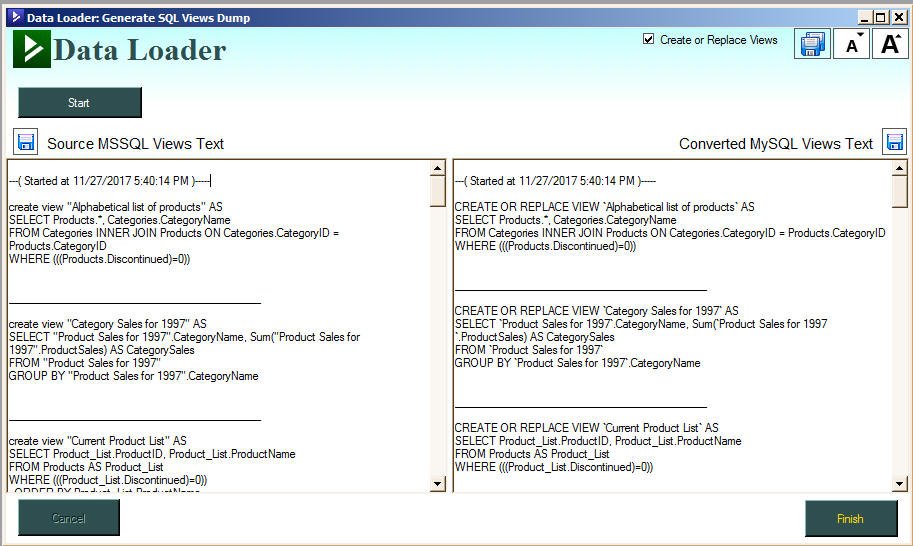
Convert MS SQL Server Views to MySQL Views (or Vice Versa)

Examples:

MS SQL View
CREATE VIEW "Alphabetical list of products" AS
SELECT Products.*, Categories.CategoryName
FROM Categories INNER JOIN Products ON Categories.CategoryID = Products.CategoryID
WHERE (((Products.Discontinued)=0))
Automatically Converts to MySQL
CREATE OR REPLACE VIEW `Alphabetical list of products` AS
SELECT Products.*, Categories.CategoryName
FROM Categories INNER JOIN Products ON Categories.CategoryID = Products.CategoryID
WHERE (((Products.Discontinued)=0))
MS SQL View
CREATE VIEW Invoices AS
SELECT Orders.ShipName, Orders.ShipAddress, Orders.ShipCity, Orders.ShipRegion, Orders.ShipPostalCode,
Orders.ShipCountry, Orders.CustomerID, Customers.CompanyName AS CustomerName, Customers.Address, Customers.City,
Customers.Region, Customers.PostalCode, Customers.Country,
(FirstName + ' ' + LastName) AS Salesperson,
Orders.OrderID, Orders.OrderDate, Orders.RequiredDate, Orders.ShippedDate, Shippers.CompanyName As ShipperName,
"Order Details".ProductID, Products.ProductName, "Order Details".UnitPrice, "Order Details".Quantity,
"Order Details".Discount,
(CONVERT(money,("Order Details".UnitPrice*Quantity*(1-Discount)/100))*100) AS ExtendedPrice, Orders.Freight
FROM Shippers INNER JOIN
(Products INNER JOIN
(
(Employees INNER JOIN
(Customers INNER JOIN Orders ON Customers.CustomerID = Orders.CustomerID)
ON Employees.EmployeeID = Orders.EmployeeID)
INNER JOIN "Order Details" ON Orders.OrderID = "Order Details".OrderID)
ON Products.ProductID = "Order Details".ProductID)
ON Shippers.ShipperID = Orders.ShipVia
Automatically Converts to MySQL
CREATE OR REPLACE VIEW Invoices AS
SELECT Orders.ShipName, Orders.ShipAddress, Orders.ShipCity, Orders.ShipRegion, Orders.ShipPostalCode,
Orders.ShipCountry, Orders.CustomerID, Customers.CompanyName AS CustomerName, Customers.Address, Customers.City,
Customers.Region, Customers.PostalCode, Customers.Country,
CONCAT(FirstName , ' ' , LastName) AS Salesperson,
Orders.OrderID, Orders.OrderDate, Orders.RequiredDate, Orders.ShippedDate, Shippers.CompanyName As ShipperName,
`Order Details`.ProductID, Products.ProductName, `Order Details`.UnitPrice, `Order Details`.Quantity,
`Order Details`.Discount,
(CAST((`Order Details`.UnitPrice*Quantity*(1-Discount)/100) AS Decimal)*100) AS ExtendedPrice, Orders.Freight
FROM Shippers INNER JOIN
(Products INNER JOIN
(
(Employees INNER JOIN
(Customers INNER JOIN Orders ON Customers.CustomerID = Orders.CustomerID)
ON Employees.EmployeeID = Orders.EmployeeID)
INNER JOIN `Order Details` ON Orders.OrderID = `Order Details`.OrderID)
ON Products.ProductID = `Order Details`.ProductID)
ON Shippers.ShipperID = Orders.ShipVia

MSSQL Views converted to MySQL

Features

  • Bulk loading for tables with millions of rows
  • Load data into existing tables
  • UPSERT and INSERT loading options
  • Imports constraints and indexes
  • Wizard based
  • Map source columns to target table columns
  • Save and schedule sessions for recurring transfers
  • Supports all versions of MS SQL Server and MySQL
  • No ODBC driver required
  • No code required
  • Select single or multiple tables to transfer
  • Select or deselect columns while transferring
  • Change destination datatypes and widths
  • Automatic datatype mismatch checking
  • Specify WHERE conditions to filter data
  • Supports VARBINARY, LONGBLOB, and picture datatypes

Economical cost of just $99 for the Standard Version. A fully functional trial version with a 50-rows limit is available for testing.

Watch Video Demo of MS SQL Server to MySQL Database Conversion Using Data Loader

Wondering How Large a Table Our Tool Can Handle?

Data Loader migrates a table with 10 million rows from MSSQL to MySQL in just a few minutes

Ready to Migrate from MS SQL to MySQL?

Download the Free Data Loader Tool Now

For seamless, fast, and reliable data migration.

Frequently Asked Questions

Use a wizard-based tool like Data Loader. It maps source columns to destination columns automatically, converts schemas, data, constraints, indexes, auto increment and default values, and completes the migration in three steps with no coding required.

Yes. Data Loader converts views in addition to tables, automatically rewriting MS SQL Server view syntax (such as string concatenation and CONVERT/CAST functions) into valid MySQL view syntax.

Yes. Free options include the MySQL Workbench Migration Wizard and the Microsoft Import and Export Wizard. Data Loader also offers a fully functional trial version limited to 50 rows per table for testing before purchase.

Using Data Loader's bulk load feature, a table with 10 million rows can be migrated from MSSQL to MySQL in just a few minutes.